PYTHON INTERVIEW QUESTIONS


What is Python? What are the benefits of using Python?

Python is a programming language with objects, modules, threads, exceptions, and automatic memory management. The benefits of pythons are that it is simple and easy, portable, extensible, build-in data structure, and it is open-source.

What is pickling and unpickling?

Pickle module accepts any Python object and converts it into a string representation and dumps it into a file by using dump function. This process is called pickling. While the process of retrieving original Python objects from the stored string representation is called unpickling.


What are the tools that help to find bugs or perform the static analysis?

PyChecker is a static analysis tool that detects the bugs in Python source code Pylint is another tool that verifies whether the module meets the coding standard.


What is the difference between list and tuple?

The difference between list and tuple is that list is mutable [ ]  while tuple is not () . 


What are built-in type does python provides?


Python provides two built-in types: 1) Mutable and 2) Immutable.


Mutable built-in types are:

  • List
  • Sets
  • Dictionaries
  • Immutable built-in types
  • Strings
  • Tuples
  • Numbers

Immutable built-in types are:

  • Strings
  • Tuples
  • Numbers


1. index() 

   index is an inbuilt function in Python, which searches for a given element from the         
    start of the list and returns the lowest index where the element appears. 

Syntax : 

list_name.index(element, start, end)


2.Leave One Out Cross-Validation (LOOCV) 

LOOCV is the cross-validation technique in which the size of the fold is “1” with “k” being set to the number of observations in the data. This variation is useful when the training data is of limited size and the number of parameters to be tested is not high.

What is the difference between LOC and ILOC in pandas?
loc gets rows (or columns) with particular labels from the index. iloc gets rows (or columns) at particular positions in the index (so it only takes integers


3. DataFrame - drop() function
The drop() function is used to drop specified labels from rows or columns. Remove rows or columns by specifying label names and corresponding axis, or by specifying directly index or column names.v

4. iterrows() is a generator that iterates over the rows of the data frame and returns                     the index of each row, in addition to an object containing the row itself.


5 Sort function 

Sorted() sorts any sequence (list, tuple) and always returns a list with the elements in sorted manner, without modifying the original sequence.


import random
from math import 
import operator

6. sample() is an inbuilt function of random module in Python that returns a particular 
    length list of items chosen from the sequence i.e. list, tuple, string or set. 
    Used for random sampling without replacement.


7. Validator:-

 The Validator Collection is a Python library that provides more than 60 functions that
  can be used to validate the type and contents of an input value.

Validators :-


8. Reindexing:-

A Reindexing changes the row labels and column labels of a DataFrame. To reindex means to conform the data to match a given set of labels along a particular axis. Reorder the existing data to match a new set of labels.


#reindex the DataFrame
df_reindexed = df.reindex(index=[0,2,5], columns=['A', 'C', 'B'])

print df_reindexed

Its output is as follows −

            A    C     B
0  2016-01-01  Low   NaN
2  2016-01-03  High  NaN
5  2016-01-06  Low   NaN
9.permutation:-

A permutation, also called an “arrangement number” or “order”, is a rearrangement of the elements of an ordered list S into a one-to-one correspondence with S itself. A string of length n has n! permutation.
# Function to find permutations of a given string
from itertools import permutations
  
def allPermutations(str):
       
     # Get all permutations of string 'ABC'
     permList = permutations(str)
  
     # print all permutations
     for perm in list(permList):
         print (''.join(perm))
        
# Driver program
if __name__ == "__main__":
    str = 'ABC'
    allPermutations(str)
Output:
ABC
ACB
BAC
BCA
CAB
CBA
 10.apply():-
The apply() function is used to invoke a python function on values of Series. Python function or NumPy ufunc to apply. Try to find better dtype for elementwise function results. If False, leave as dtype=object.

Example :

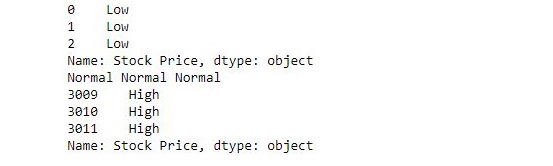
The following example passes a function and checks the value of each element in series and returns low, normal or High accordingly.

import pandas as pd
  
# reading csv
s = pd.read_csv("stock.csv", squeeze = True)
  
# defining function to check price
def fun(num):
  
    if num<200:
        return "Low"
  
    elif num>= 200 and num<400:
        return "Normal"
  
    else:
        return "High"
  
# passing function to apply and storing returned series in new
new = s.apply(fun)
  
# printing first 3 element
print(new.head(3))
  
# printing elements somewhere near the middle of series
print(new[1400], new[1500], new[1600])
  
# printing last 3 elements
print(new.tail(3))

Output:

11. Lambda:-

We use lambda functions when we require a nameless function for a short period of time. In Python, we generally use it as an argument to a higher-order function (a function that takes in other functions as arguments).


Example :

In the following example, a temporary anonymous function is made in .apply itself using lambda. It adds 5 to each value in series and returns a new series.

import pandas as pd
s = pd.read_csv("stock.csv", squeeze = True)
  
# adding 5 to each value
new = s.apply(lambda num : num + 5)
  
# printing first 5 elements of old and new series
print(s.head(), '\n', new.head())
  
# printing last 5 elements of old and new series
print('\n\n', s.tail(), '\n', new.tail())

Output:

0    50.12
1    54.10
2    54.65
3    52.38
4    52.95
Name: Stock Price, dtype: float64 

0    55.12
1    59.10
2    59.65
3    57.38
4    57.95
Name: Stock Price, dtype: float64

3007    772.88
3008    771.07
3009    773.18
3010    771.61
3011    782.22
Name: Stock Price, dtype: float64
 
3007    777.88
3008    776.07
3009    778.18
3010    776.61
3011    787.22
Name: Stock Price, dtype: float64

As observed, New values = old values + 5


12.value count():-

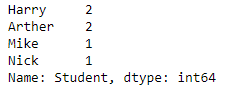
value_counts() function returns object containing counts of unique values. The resulting object will be in descending order so that the first element is the most frequently-occurring element. Excludes NA values 

Example #1: Use Index.value_counts() function to count the number of unique values in the given Index.
# importing pandas as pd
import pandas as pd
  
# Creating the index
idx = pd.Index(['Harry', 'Mike', 'Arther', 'Nick',
                'Harry', 'Arther'], name ='Student')
  
# Print the Index
print(idx)

Output :

Let’s find the count of all unique values in the index.

# find the count of unique values in the index
idx.value_counts()

Output :


13. groupby:-

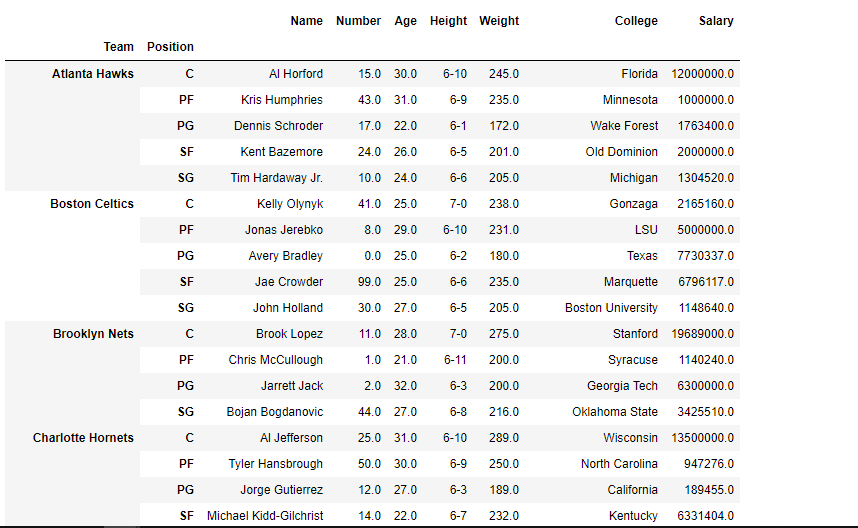
groupby() function is used to split the data into groups based on some criteria. pandas objects can be split on any of their axes. The abstract definition of grouping is to provide a mapping of labels to group name

Example: Use groupby() function to form groups based on more than one category (i.e. Use more than one column to perform the splitting).

# importing pandas as pd
import pandas as pd
  
# Creating the dataframe 
df = pd.read_csv("nba.csv")
  
# First grouping based on "Team"
# Within each team we are grouping based on "Position"
gkk = df.groupby(['Team', 'Position'])
  
# Print the first value in each group
gkk.first()

Output :


CONVERT PDF TO AUDIO FILES


13.Using stack() method:

Stack method works with the MultiIndex objects in DataFrame, it returning a DataFrame with an index with a new inner-most level of row labels. It changes the wide table to a long table.

# import pandas module
import pandas as pd
  
# making dataframe
df = pd.read_csv("nba.csv")
  
# reshape the dataframe using stack() method
df_stacked = df.stack()
  
print(df_stacked.head(26))


14.Using unstack() method:
Unstack is similar to stack method, It also works with multi-index objects in dataframe, producing a reshaped DataFrame with a new inner-most level of column labels.

# import pandas module
import pandas as pd
  
# making dataframe
df = pd.read_csv("nba.csv")
  
# unstack() method
df_unstacked = df_stacked.unstack()
print(df_unstacked.head(10))

Output:

15
Using melt() method:
Melt in pandas reshape dataframe from wide format to long format. It uses the “id_vars[‘col_names’]” for melt the dataframe by column names.

# import pandas module
import pandas as pd
  
# making dataframe
df = pd.read_csv("nba.csv")
  
# it takes two columns "Name" and "Team"
df_melt = df.melt(id_vars =['Name', 'Team']) 
print(df_melt.head(10))

Output:


Comments